Index
AWorld Train provides a bridge between the AWorld agent ecosystem and various external training frameworks like Reinforcement Learning (RL) libraries. It is designed to be framework-agnostic, allowing you to bring your AWorld agents to your favorite training environments.
The following diagram illustrates the overall architecture and the interaction between the Environment host and Training cluster:
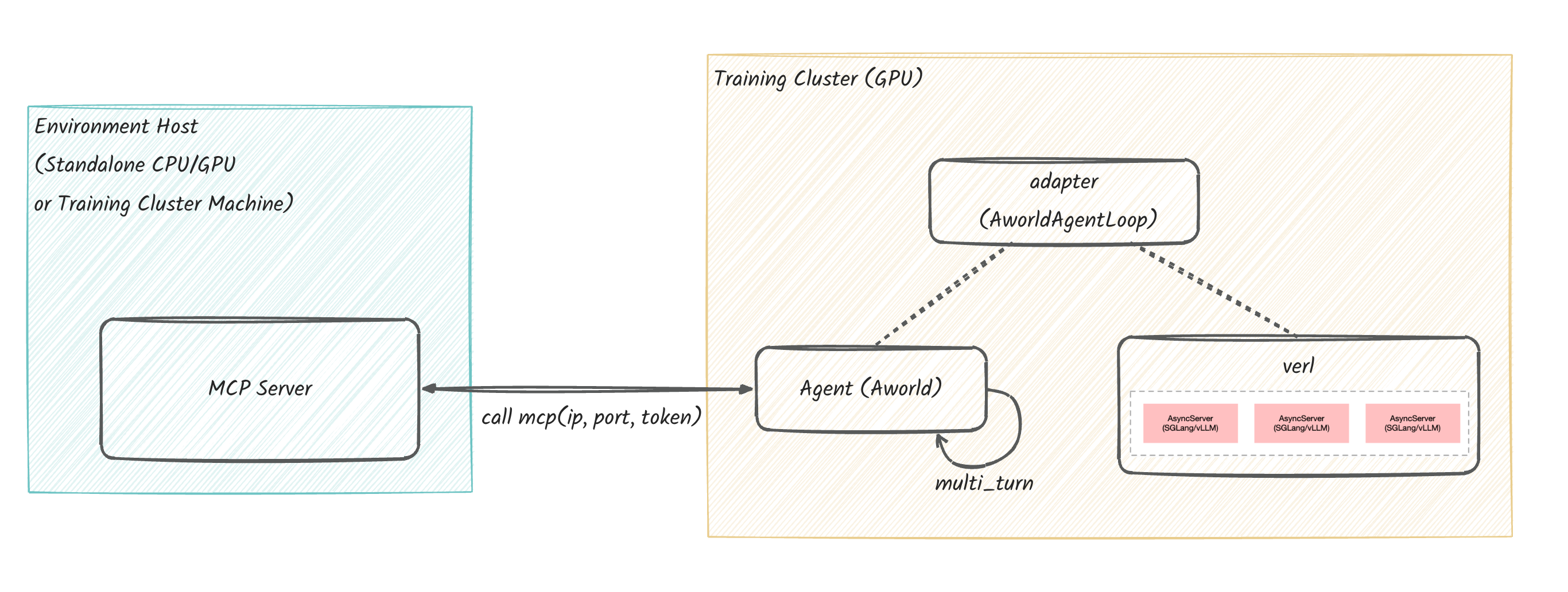
Environment host construction
First, you need to set up the environment where the agent's tools will run.
Choose a machine (which can be a training machine).
Machine sizing recommendation: - For capacity planning, allocate roughly 2C4G per concurrent worker. - Example: for concurrency=8, plan for ~16C and ~32G.
# git clone AWorld
git clone git@github.com:inclusionAI/AWorld.git
cd /path/to/AWorld
cp ./env/gaia-mcp-server/mcp_servers/.env_template ./env/gaia-mcp-server/mcp_servers/.env
JINA_API_KEY=<YOUR_JINA_API_KEY>
TAVILY_API_KEY=<YOUR_TAVILY_API_KEY>
GOOGLE_API_KEY=<YOUR_GOOGLE_API_KEY>
GOOGLE_CSE_ID=<YOUR_GOOGLE_CSE_ID>
DATALAB_API_KEY=<YOUR_DATALAB_API_KEY>
E2B_API_KEY=<YOUR_E2B_API_KEY>

MCP_LLM_BASE_URL=<YOUR_MCP_LLM_BASE_URL>
MCP_LLM_MODEL_NAME=<YOUR_MCP_LLM_MODEL_NAME>
MCP_LLM_API_KEY=<YOUR_MCP_LLM_API_KEY>

BROWSERUSE_LLM_BASE_URL=${MCP_LLM_BASE_URL}
BROWSERUSE_LLM_MODEL_NAME=${MCP_LLM_MODEL_NAME}
BROWSERUSE_LLM_API_KEY=${MCP_LLM_API_KEY}
CODE_LLM_BASE_URL=${MCP_LLM_BASE_URL}
CODE_LLM_MODEL_NAME=${MCP_LLM_MODEL_NAME}
CODE_LLM_API_KEY=${MCP_LLM_API_KEY}
THINK_LLM_BASE_URL=${MCP_LLM_BASE_URL}
THINK_LLM_MODEL_NAME=${MCP_LLM_MODEL_NAME}
THINK_LLM_API_KEY=${MCP_LLM_API_KEY}
GUARD_LLM_BASE_URL=${MCP_LLM_BASE_URL}
GUARD_LLM_MODEL_NAME=${MCP_LLM_MODEL_NAME}
GUARD_LLM_API_KEY=${MCP_LLM_API_KEY}
AUDIO_LLM_BASE_URL=${MCP_LLM_BASE_URL}
AUDIO_LLM_MODEL_NAME=${MCP_LLM_MODEL_NAME}
AUDIO_LLM_API_KEY=${MCP_LLM_API_KEY}
IMAGE_LLM_BASE_URL=${MCP_LLM_BASE_URL}
IMAGE_LLM_MODEL_NAME=${MCP_LLM_MODEL_NAME}
IMAGE_LLM_API_KEY=${MCP_LLM_API_KEY}
VIDEO_LLM_BASE_URL=${MCP_LLM_BASE_URL}
VIDEO_LLM_MODEL_NAME=${MCP_LLM_MODEL_NAME}
VIDEO_LLM_API_KEY=${MCP_LLM_API_KEY}
Next, run the startup script to launch the MCP server locally:
cd /path/to/Aworld
# use --docker_dir to specify the docker directory to build
# e.g., --docker_dir=gaia-mcp-server
python -m env.train_env --docker_dir=gaia-mcp-server
Once the MCP server starts successfully, it will output the connection details:
You will need the ip, port and token from this output for the next step, where you'll configure the Agent on your training machine.For instructions on deploying the environment on Kubernetes, please refer to ../env/README.md.
Training cluster Setup
1. Create an Agent or Swarm
Now, on the training cluster machine, you must make the MCP service credentials available to your agent. Use the ip, port and token from the Environment host section and export them as environment variables or add them to a .env file:
# export them as environment variables
# replace <ip>, <port> and <token> with the ip, port and token from Step 1
export MCP_SERVER_URL=http://<ip>:<port>/mcp
export MCP_SERVER_TOKEN=<token>

# or add them to `.env` file
# echo "MCP_SERVER_URL=http://<ip>:<port>/mcp" >> .env
# echo "MCP_SERVER_TOKEN=<token>" >> .env
Then install aworld and RL framework:
# Python>=3.10 is recommended.

# Install AWorld
pip install aworld

# Framework-specific deps (VeRL example)
pip install verl==0.5.0
With the connection details configured, you can define your agent within your chosen training framework. For VeRL, this is accomplished by implementing a custom AgentLoop.
For example, GaiaAgentLoop inherits from AworldAgentLoop and implements the build_agents method.
from aworld.agents.llm_agent import Agent
from aworld.config import AgentConfig

from train.adapter.verl.aworld_agent_loop import AworldAgentLoop
from train.adapter.verl.common import get_agent_tool_env_and_servers

class GaiaAgentLoop(AworldAgentLoop):
    def build_agents(self):
        # Get the environment configuration and server details.
        # Note: The MCP server must be running (Step 1) and the
        # MCP_SERVER_URL/MCP_SERVER_TOKEN environment variables must be set.
        gaia_env_config, gaia_env_servers = get_agent_tool_env_and_servers()

        return Agent(
            conf=AgentConfig(
                # Get the dynamic llm server address from the server manager.
                # The llm server is launched within VeRL.
                llm_base_url=self.get_llm_server_address(),
                llm_model_name=self.get_llm_server_model_name(),
            ),
            name="gaia_super_agent",
            system_prompt="YOUR SYSTEM PROMPT",

            # MCP tool configuration for the agent
            mcp_config=gaia_env_config,
            mcp_servers=gaia_env_servers,
        )
2. Run Training
Before run training, specify your custom AgentLoop in the agent.yaml:
# In agent.yaml
- name: gaia_agent
  _target_: train.examples.train_gaia_with_aworld_verl.custom_agent_loop.GaiaAgentLoop
Finally, run the training script. This script is typically a run.sh file based on the VeRL example.
run.sh.
A complete, runnable example, including a run.sh script tailored for GaiaAgentLoop, is available in ./examples/train_gaia_with_aworld_verl/.
Advanced Tutorial
How to Create a Complex Swarm
Instead of a single agent, you can also train a multi-agent swarm. Simply have your build_agents method (or equivalent setup function) return a Swarm object instead of a single Agent. AWorld and the training adapter will handle the rest.
# In your AgentLoop or setup file
def build_agents(self, ...) -> Union[Agent, Swarm]:
    # ... (create individual agents)
    agent_to_be_train = Agent(
      conf=AgentConfig(
          # For the agent to be trained, llm_base_url and llm_model_name are obtained from the services launched by VeRL
          llm_base_url=self.get_llm_server_address(),
          llm_model_name=self.get_llm_server_model_name(),
      ),
    )

    plan_agent = Agent(
      conf=AgentConfig(
          # Provide a ready-to-use OpenAI-compatible llm service address, model name, and api_key
          llm_base_url="",
          llm_model_name="",
          llm_api_key=""
      ),
    )

    exe_agent = Agent(
      conf=AgentConfig(
          # Provide a ready-to-use OpenAI-compatible llm service address, model name, and api_key
          llm_base_url="",
          llm_model_name="",
          llm_api_key=""
      ),
    )

    sum_agent = Agent(
      conf=AgentConfig(
          # Provide a ready-to-use OpenAI-compatible llm service address, model name, and api_key
          llm_base_url="",
          llm_model_name="",
          llm_api_key=""
      ),
    )

    # Return a Swarm composed of your agents
    return Swarm(
        agent_to_be_train, plan_agent, exe_agent, sum_agent,
        # ... other swarm configuration
    )
How to Integrate with Other Training Frameworks
AWorld Train is designed for extensibility. To add support for a new training framework (e.g., "Swift"), you would typically need to:
- Create a new Adapter: Inside the
train/adapter/directory, create a new folder for your framework (e.g.,swift/). - Implement the Core Logic: Create a primary class (e.g.,
AworldAgentTrainer) that inherits from a base class of the target framework. This class will be responsible for:- Receiving tasks or observations from the framework's environment.
- Run the AWorld agent (
Runners.sync_run(input=input, agent=agent)) to get an action. - Returning the agent's response back to the framework.
- Handling rewards and updates.
- Create an Example: Add a new example in the
train/examples/directory to demonstrate how to use the new adapter.
You can refer to the existing verl adapter (train/adapter/verl/) as a reference implementation.