AworldServer
AworldServer is an execution environment for the Aworld framework that integrates MCP LLM models. It supports distributed deployment and dynamic scaling.
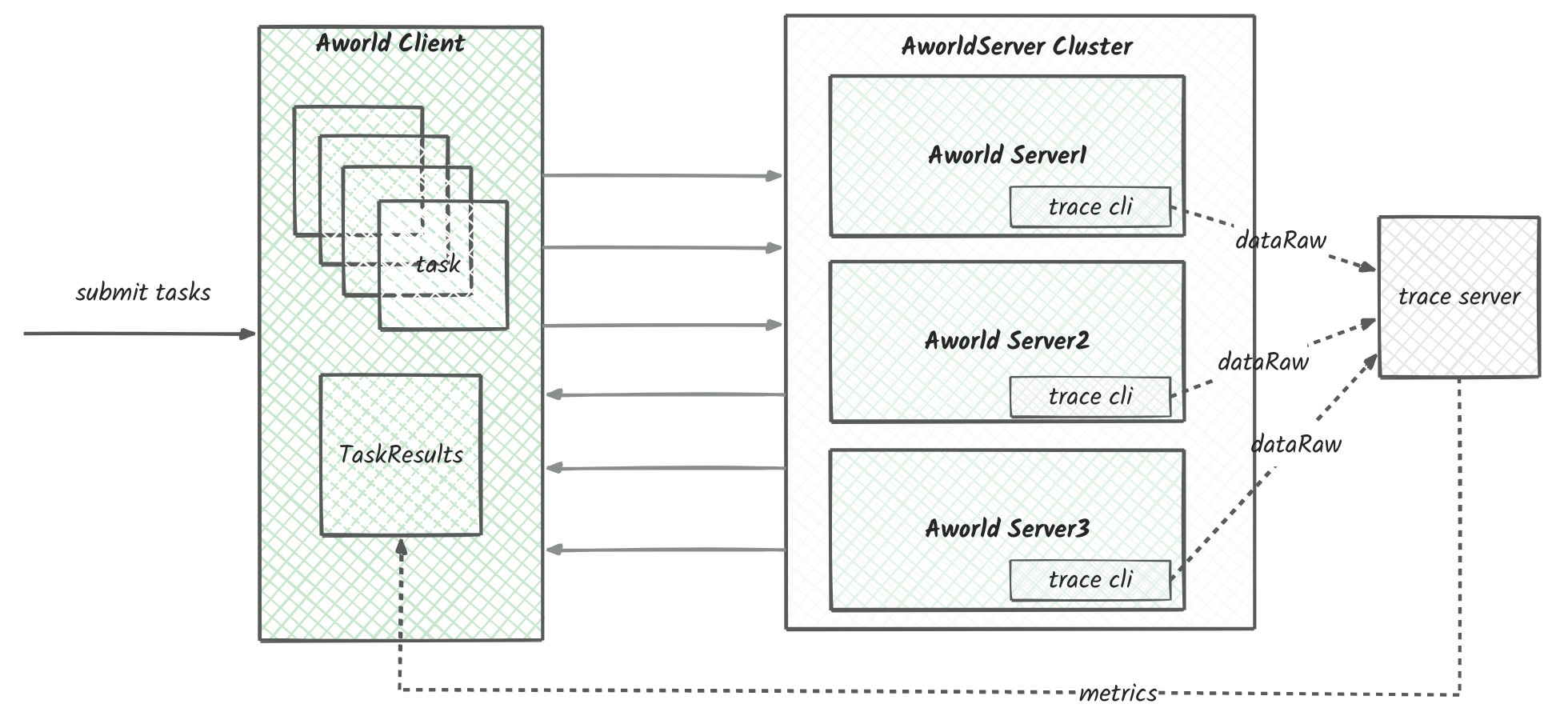
The system features:
- Distributed Architecture: Supports multi-server deployment with load balancing
- Dynamic Scaling: Ability to adjust server capacity based on demand
- LLM Integration: Built-in MCP LLM model support
- Asynchronous Processing: Uses asynchronous programming patterns for improved performance
- Containerized Deployment: Docker containerization support for easy environment management
🚀 Quick Start
- Start services using Docker Compose:
docker build  --build-arg MINIMUM_BUILD=true -f Dockerfile  --progress=plain -t aworldserver:main .

docker compose up -d
You can modify the docker-compose.yaml file to adjust the number of server instances. The default configuration includes 3 instances:
- Usage Methods:
a. OpenWebUI Integration: - Configure external link in OpenWebUI settings - Add AworldServer endpoints to the configuration - Set up API key authentication
b. Python Client Usage:
# Initialize AworldTaskClient with server endpoints
AWORLD_TASK_CLIENT = AworldTaskClient(
    know_hosts=["localhost:9299", "localhost:9399", "localhost:9499"]
)

async def _run_gaia_task(gaia_question_id: str) -> None:
    """Run a single Gaia task with the given question ID.

    Args:
        gaia_question_id: The ID of the question to process
    """
    global AWORLD_TASK_CLIENT
    task_id = str(uuid.uuid4())

    # Submit task to Aworld server
    await AWORLD_TASK_CLIENT.submit_task(
        AworldTask(
            task_id=task_id,
            agent_id="gaia_agent",
            agent_input=gaia_question_id,
            session_id="session_id",
            user_id="SYSTEM"
        )
    )

    # Get and print task result
    task_result = await AWORLD_TASK_CLIENT.get_task_state(task_id=task_id)
    print(task_result)

async def _batch_run_gaia_task(start_i: int, end_i: int) -> None:
    """Run multiple Gaia tasks in parallel.

    Args:
        start_i: Starting question ID
        end_i: Ending question ID
    """
    tasks = [
        _run_gaia_task(str(i))
        for i in range(start_i, end_i + 1)
    ]
    await asyncio.gather(*tasks)

if __name__ == '__main__':
    # Run batch processing for questions 1-5
    asyncio.run(_batch_run_gaia_task(1, 5))
curl http://localhost:9299/v1/chat/completions \
  -H "Content-Type: application/json" \
  -H "Authorization: Bearer 0p3n-w3bu!" \
  -d '{
  "model": "gaia_agent",
  "messages": [
    {
      "role": "user",
      "content": [
        {
          "type": "text",
          "text": "5"
        }
      ]
    }
  ]
}'
🔑 Key Features
- Distributed Task Processing System
- Multi-server load balancing
- Round-robin task distribution
-
Asynchronous task processing
-
Docker Containerization
- Multi-instance deployment
- Environment variable configuration
-
Auto-restart mechanism
-
API Services
- FastAPI framework support
- RESTful API design
-
Asynchronous request handling
-
Development Tools
- Debug mode support
- Batch task processing
-
Task state tracking
-
Security Features
- API key authentication
- Session management
- User authentication
📦 Installation and Setup
Get started with aworldserver in a few easy steps:
-
Ensure Python 3.11 is installed.
-
Install the required dependencies:
- Start the aworld server:
Custom debug
please run debug_run.py