实验 7-8:从两两比较到模型排名
同一道题有两份匿名回答,评审选了 A。这个选择能让 A 涨多少分?如果 A 刚刚赢过一位强手,又和一位新上榜的模型打平,它的分数还会上升吗?先算一场,再看上百万场比较怎样汇成一张榜。
理解问题与方法
在线 Elo 先用当前分差估计 A 对阵 B 的期望得分,再根据实际得分修正两者的评级。实现中胜、平、负分别得 1、0.5、0 分。沿用本实验的参数,更新规则为:
假设 A、B 都从 1000 分起步,K 取 4。首场 A 胜,预期得分是 0.5,实际得 1,A 涨到 1002,B 降到 998。此时双方再打平,A 的预期已略高于 0.5,拿到半分反而会略微降分。在线更新会把每场结束时的分数带入下一场;另一条路线用 Bradley–Terry 模型对整批比较拟合相对强弱。两种做法都要考虑对手构成:若两组模型之间没有任何直接或间接交手,组内投票再多,也不能确定两组的相对位置。
本项目提供 NumPy、Numba 和并行计算实现,还能输出胜率估计、历史快照、静态图和交互动画。先用小样本理解评分,再读有时间范围的 Chatbot Arena 投票记录;旧版脚本及输出目录沿用实验调整编号前的 7-7。
三类对战源
simulate:合成对战(有真值),用于验证是否恢复出正确排序。arena:离线加载arena_data.json(约 2GB);可用--sample抽样。llm:调用 LLM 判断对战,交换答案位置复评;支持anthropic、openrouter和auto。
auto 按已配置的凭据选择服务:优先 Anthropic,未配置时再选 OpenRouter。若要在调用失败后改用另一家,可显式指定后端。无论用哪家,都将相同答案交换位置再评一次;两次意见不一致时记平局。因此平局数也可能包含对顺序敏感的判定。
两种核心评分方法
- Bradley–Terry:利用整批对局拟合模型间的分差,本次 Arena 归档以它作为正式排名。
- Online Elo:更贴近课程里的机制讲解,速度快但对顺序敏感。
注意
--sample、pipeline、--top-n等参数见命令行帮助。- 建议先看 CLI 输出再对照
leaderboard与可视化文件确认理解。
准备环境与输入
直接查看下方的归档榜单只需 Python 标准库。要模拟对战、重新拟合或绘图,再安装实验依赖。
安装与运行
# 从仓库根目录进入实验目录
cd chapter7/elo-leaderboard
uv venv --python 3.12
uv pip install -r requirements.txt
source .venv/bin/activate
# Windows PowerShell:.\.venv\Scripts\Activate.ps1
# Windows cmd:.venv\Scripts\activate.bat
# 也可使用 python -m venv .venv,激活后用 python -m pip install -r requirements.txt
按照步骤完成实验
先阅读 CLI 中的离线演示入口,用小规模比较理解胜负如何改变分数。随后按下文准备公开投票数据,比较不同估计方式,并用重采样观察排名区间。
测试
命令行(cli.py)
cli.py 是统一入口:
- battle:生成/采集两两对战
- elo:计算评级
- leaderboard:出榜
- pipeline:端到端一条龙
使用示例
在本实验目录运行两次评分。第一条命令只生成一份对局记录;后两条在同一份输入上比较在线更新和整批拟合。
out=$(mktemp -d)
python cli.py battle --source simulate --num-battles 500 --seed 42 --output "$out/battles.json"
python cli.py elo --input "$out/battles.json" --method online-elo
python cli.py elo --input "$out/battles.json" --method bradley-terry --bootstrap 20
这组模拟里,名为 gpt-4 的选手参加了 117 场,两张表给出的得分率都是 70.1%(平局按半分计)。这个比例直接来自那份对局文件。两张表的评级却不同,因为一个逐场更新,另一个用所有比较拟合。这里的模型名只是模拟器里的选手标签。
分析结果与形成判断
打开这次运行的汇总。原文件有 1,799,991 条记录。筛选程序要求对局匿名、至少一轮,检查投票标签,并在存在去重抽样标记时只取入选记录。筛选后保留 1,670,250 场,涉及 129 个模型。保留的对局里有 281,121 次普通平局,还有 295,254 次投了“两者都差”。两种投票在相对得分上都让双方各得半分,但若想回答“用户对回答是否满意”,这两个标签值得分别统计。
不下载原始投票文件也能检查归档榜单。运行以下命令,读出两种方法的第一名以及整批拟合第四、第五名的区间:
python3 - <<'PYTHON'
import json
from pathlib import Path

run = Path("validation/runs/exp7-7-arena-20260731-v1")
for method in ("online_elo", "bradley_terry"):
    rows = json.loads((run / f"{method}.json").read_text())
    print(method, rows[0]["model"])
    if method == "bradley_terry":
        for row in rows[3:5]:
            print(row["model"], round(row["lower_ci"], 1), round(row["upper_ci"], 1))
PYTHON
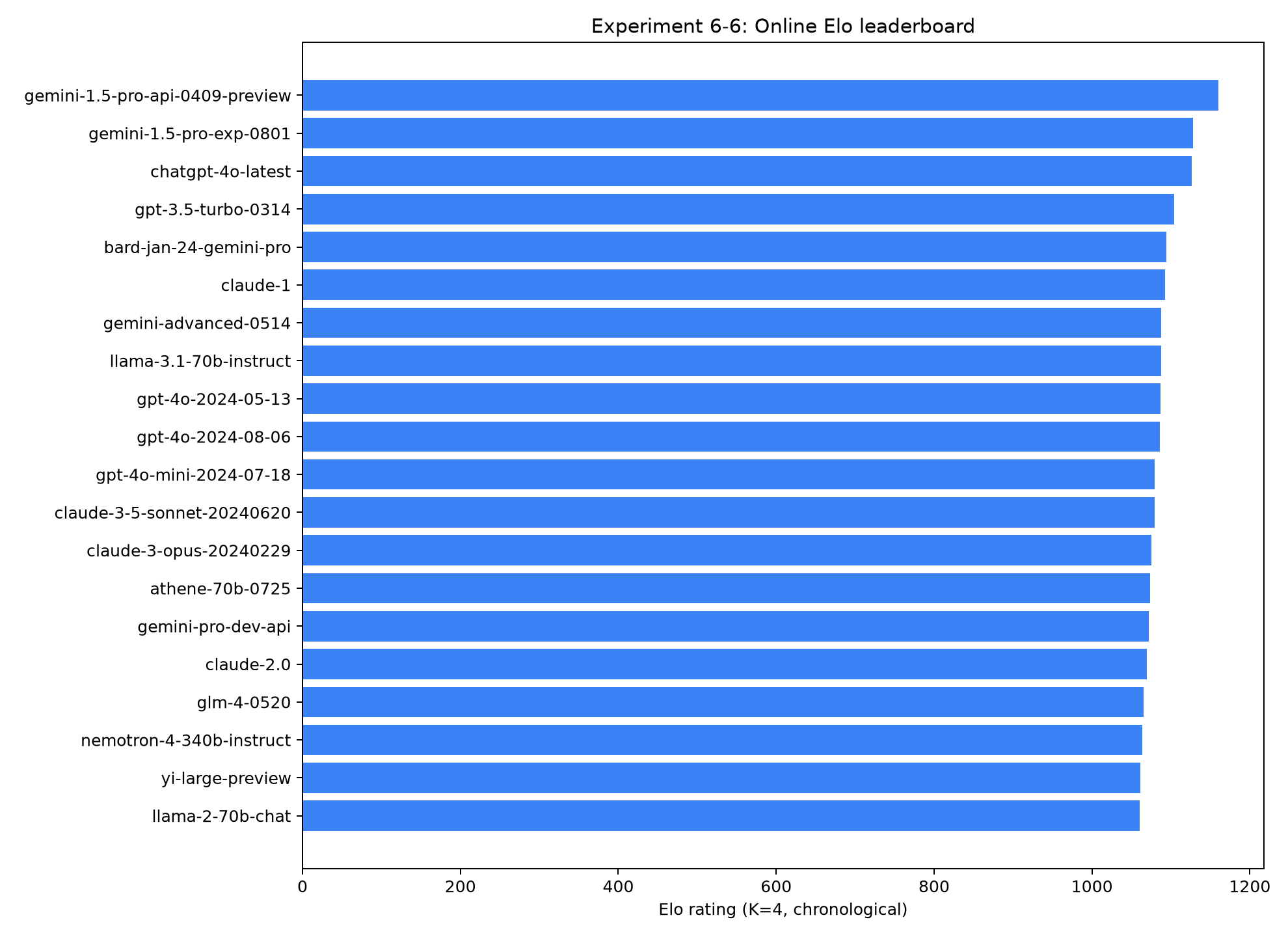
同一批截至 2024 年 8 月的投票,按时间逐场更新时排第一的是 gemini-1.5-pro-api-0409-preview,整批拟合时排第一的是 chatgpt-4o-latest。再看整批榜的第四、第五名:第四名的评分为 1163.0,区间为 1161.2~1166.6;第五名的评分为 1159.7,区间为 1156.0~1161.8。每个区间都来自 20 次重采样,单位是评分。两段区间有重叠,从这张汇总表还看不出两者在多少次重采样中交换了名次,因为表里没有保留同一轮的两个分数。
要看这个区别,可以接着用前面生成的 500 场模拟对局。下面每轮有放回地抽取 500 场,重新拟合整张榜,再从同一行取出两位选手的评分。请在设置过 out 的同一个终端中运行:
python - "$out/battles.json" <<'PYTHON'
import sys
import pandas as pd
from bradley_terry import compute_mle_elo, get_bootstrap_result

battles = pd.read_json(sys.argv[1])
scores = get_bootstrap_result(battles, compute_mle_elo, num_round=20)
gap = scores["gpt-4"] - scores["claude-3-opus"]
print("逐轮分差(前五轮)", gap.head().round(1).tolist())
print("前者评分更高的轮数", int((gap > 0).sum()), "/", len(gap))
ranks = scores.rank(axis=1, ascending=False, method="min")
print("前者的名次分布", ranks["gpt-4"].value_counts().sort_index().to_dict())
PYTHON
在上述随机种子下,前两轮分差约为 +55.2、+31.7,第三轮变为 −26.2。20 轮中,gpt-4 有 14 轮高于 claude-3-opus,但只拿了 13 次第一,另有 5 次第二和 2 次第三。分差的正负回答“两者谁在前面”;名次还取决于其他选手。最后一行按每轮全体选手的分数排名,并列时取共同的最高名次。20 轮适合看懂计算过程,用这组模拟结果解读真实 Arena 榜单还需要换成对应的投票数据。
复核归档时要区分文件版本。最初保存该榜单的提交可以通过当时的校验器。现有目录中,评分表的哈希仍然吻合;汇总 JSON 与原版逐字段比较,只改了实验编号。另外四份实现文件与当时版本的哈希不同。这里的读表练习使用归档评分,重新拟合则需要原始投票文件。
检查自己的解释
假设 A 在每轮都排在 B 前面,A 的名次仍然可能从第一降到第二吗?试着写出第三位选手 C 在这两轮的名次,再想想单看 A、B 的分差能解释多少变化。
阅读实现与继续探索
项目结构
在线 Elo 可以逐场跟踪预期得分与实际得分;Bradley–Terry 拟合给出整批评分与重采样区间。榜单图和历史快照动画使用同一归档期的结果。
English
Experiment 7-7: Building Model Leaderboard from Pairwise Comparison Data
This project implements an Elo rating system from scratch to analyze model performance using Chatbot Arena's public voting data. The implementation demonstrates how the Bradley-Terry model extracts relative model capabilities from millions of pairwise comparison votes.
Overview
The Elo rating system is a method for calculating the relative skill levels of players (or in this case, AI models) in zero-sum games. Originally developed for chess, it has been adapted to rank AI language models based on head-to-head comparisons from user votes.
Key Features
- High-performance implementation: NumPy + Numba JIT + parallel processing for optimal speed
- Real voting data analysis: Uses actual Chatbot Arena voting data with millions of pairwise comparisons
- Win rate prediction: Calculates expected win probabilities between any two models
- Historical tracking: Builds time-series snapshots showing ranking evolution
- Interactive visualizations: Multiple visualization types including animated bar chart races
- Scalable: Efficiently handles 2GB datasets with hundreds of thousands of matches
Mathematical Foundation
The Elo system is based on the Bradley-Terry model, which models the probability that model A beats model B as:
After each match, ratings are updated using:
Where:
- R_A is the current rating of model A
- K is the learning rate (K-factor)
- S_A is the actual score (1 for win, 0 for loss, 0.5 for tie)
- E_A is the expected score (predicted win probability)
Requirements
- Disk Space: At least 3GB free (2GB for data file, 1GB for processing)
- RAM: 4GB+ recommended for full dataset analysis
- Internet: Stable connection for ~2GB download
- Python: 3.12 for the root
ch6install
Installation
# From the repository root: use the shared Chapter 6 environment
uv sync --locked --python 3.12 --extra ch6

# Activate it before changing directories:
# macOS/Linux:
source .venv/bin/activate
# Windows PowerShell: .\.venv\Scripts\Activate.ps1
# Windows cmd: .venv\Scripts\activate.bat

# pip fallback when uv is not installed:
# python -m pip install -e ".[ch6]"

cd chapter7/elo-leaderboard

# Single-project compatibility path, still supported during migration:
# python -m pip install -r requirements.txt
Testing
# From the repository root, include the shared test tooling:
uv sync --locked --python 3.12 --extra ch6 --extra dev

# Activate it before changing directories:
source .venv/bin/activate

# pip fallback when uv is not installed:
# python -m pip install -e ".[ch6,dev]"

cd chapter7/elo-leaderboard
python -m pytest tests
Canonical full-data validation
The accepted Experiment 7-7 run uses the complete public 2024-08-14 Arena snapshot rather than the synthetic quickstart or a small sample. The 2.0 GB input is not committed to git; the manifest records its official URL, byte size, 1,799,991-row count, and SHA-256.
curl -L \
  https://storage.googleapis.com/arena_external_data/public/clean_battle_20240814_public.json \
  -o /path/to/arena_data.json

python validation/run_experiment.py \
  --input /path/to/arena_data.json \
  --output-dir validation/runs/exp7-7-arena-20260731-v1 \
  --bootstrap-rounds 20

python validation/validate_evidence.py \
  validation/runs/exp7-7-arena-20260731-v1 \
  --input /path/to/arena_data.json
The retained canonical run accepted 1,670,250 anonymous, deduplicated votes over 129 models. Chronological online Elo (initial 1000, K=4) and the Bradley-Terry reconstruction reached Spearman 0.787, Kendall 0.606, and 12/20 top-model overlap. This is the expected broad agreement, not score identity: online Elo is order-dependent while Bradley-Terry fits all comparisons at once. Seventeen cumulative monthly snapshots drive the retained D3 animation.
Canonical evidence: validation/latest.json.
命令行工具 / Command-Line Interface (cli.py)
cli.py 是本实验统一的 argparse 命令行入口(中文 --help),把整条流水线拆成子命令:
对战 (battle) -> 计算评分 (elo) -> 展示排行榜 (leaderboard),并提供 pipeline 一步到位。
python cli.py --help              # 查看全部子命令
python cli.py battle --help       # 查看某个子命令的参数

# 默认离线端到端演示:模拟对战 -> 在线 Elo -> 最终排行榜表格(无需任何数据/API)
python cli.py                     # 等价于 python cli.py pipeline
子命令
| 子命令 | 作用 | 关键参数 |
|---|---|---|
battle |
生成两两对战结果 | --source {simulate,arena,llm}、--num-battles、--tie-prob、--seed、--sample、--output |
elo |
从对战结果计算评分 | --method {online-elo,bradley-terry}、--k、--bootstrap、--input、--output |
leaderboard |
渲染最终排行榜表格 | --input(对战或评分文件)、--method、--bootstrap、--top-n |
pipeline |
一步跑完 对战 -> Elo -> 排行榜 | 上述参数的并集 |
三种对战来源(--source)
simulate(默认,纯离线):从已知的潜在实力分模拟对战。因为真值已知,可用来校验恢复出的排行榜排序是否正确;--tie-prob控制平局比例,用于演练平局处理。arena(离线):加载真实 Chatbot Arena 投票数据(默认arena_data.json,约 2GB),可用--sample N抽样。llm(需 API):用 LLM 做配对评判,并内置位置偏差消除——每对交换顺序各评一次,两次判决一致才计胜负、否则记为平局(对应书中 6.4 位置偏差讨论)。仅此来源需要 LLM API Key。
两种评判后端(--judge-backend {anthropic,openrouter,auto},默认 auto):
- anthropic:官方 anthropic SDK,用 ANTHROPIC_API_KEY。
- openrouter:OpenAI 兼容 SDK 指向 https://openrouter.ai/api/v1,用 OPENROUTER_API_KEY。内部 Claude 名字会自动映射为 OpenRouter id(claude-opus-4-8 → anthropic/claude-opus-4.8,claude-haiku-4-5 → anthropic/claude-haiku-4.5);已含 / 的 id(如 openai/gpt-5.6-luna)原样透传。当直连 Anthropic key 缺失或失效时用它兜底。
- auto(默认):有 ANTHROPIC_API_KEY 走 anthropic,否则回退 openrouter。注意 auto 只看 key 是否存在、不校验有效性;若 ANTHROPIC_API_KEY 存在但已失效,请显式 --judge-backend openrouter。
位置偏差消除与 A/B/tie 解析逻辑与后端无关,两条路径完全一致。
分步示例
# 1) 模拟 5000 场对战(含 10% 平局)
python cli.py battle --source simulate --num-battles 5000 --output battles.json

# 2) 用官方 Bradley-Terry MLE + 100 轮 bootstrap 置信区间计算评分
python cli.py elo --input battles.json --method bradley-terry --bootstrap 100

# 3) 展示前 20 名排行榜(也可直接读评分文件)
python cli.py leaderboard --input battles.json --top-n 20

# 用真实 Arena 数据抽样跑(离线)
python cli.py pipeline --source arena --arena-file arena_data.json --sample 50000 --method bradley-terry --bootstrap 100

# LLM 评判对战(需要 API Key)——官方 Anthropic
export ANTHROPIC_API_KEY=your-anthropic-api-key
python cli.py battle --source llm --candidate-models claude-opus-4-8 claude-haiku-4-5

# LLM 评判对战——通过 OpenRouter 兜底(直连 Anthropic key 缺失/失效时)
export OPENROUTER_API_KEY=your-openrouter-api-key
python cli.py battle --source llm --judge-backend openrouter \
  --judge-model claude-opus-4-8 \
  --candidate-models anthropic/claude-haiku-4.5 openai/gpt-5.6-luna
模拟来源会同时打印真值潜在实力,方便和恢复出的排行榜对照;在线 Elo 与 Bradley-Terry 两种方法都应恢复出与真值一致的排名(分值不必精确对齐,见下文说明)。
Quick Start
The project implements two ranking methods following official Chatbot Arena:
1. Bradley-Terry Model (Default - Recommended)
Use this for: Official leaderboard, stable rankings, production use
Key features: - ✅ Official Chatbot Arena method - ✅ Uses sklearn LogisticRegression for Maximum Likelihood Estimation - ✅ Order-independent (processes all matches simultaneously) - ✅ Includes 95% confidence intervals via bootstrap (100 samples) - ✅ More stable and reliable rankings
Processing time: ~2-3 minutes (including bootstrap)
2. Online Elo (K=4)
Use this for: Understanding Elo mechanics, educational purposes, faster computation
Key features: - ✅ K-factor = 4 (official value used by Chatbot Arena) - ✅ Simple sequential rating updates - ✅ Order-dependent (processes matches chronologically) - ✅ Faster computation (~30 seconds) - ⚠️ Less stable, can vary based on match order
Method Comparison
| Feature | Bradley-Terry | Online Elo |
|---|---|---|
| Stability | High (MLE fit) | Medium (sequential) |
| Order dependence | None | High |
| Confidence intervals | Yes (bootstrap) | No |
| Speed | Slower (~3 min) | Faster (~30 sec) |
| Official method | ✅ Yes | For comparison only |
| Recommended | ✅ Production | Educational |
What Both Methods Do
- Download Chatbot Arena voting data (~2GB, 5-15 minutes depending on connection)
- Apply official filters:
- Anonymous votes only (blind evaluation)
- Deduplication (removes top 0.1% redundant prompts)
- Compute model ratings using selected method
- Calculate predicted win rates between all model pairs
- Generate visualizations:
leaderboard.png- Top 20 models ranked by ratingrating_distribution.png- Rating histogram and statisticswin_rate_matrix.png- Predicted win rates (top 30 models)
Note: The initial data download is ~2GB and may take several minutes. A progress bar shows download status.
Quick Demo (Synthetic Data)
To quickly understand Elo mechanics without downloading 2GB:
This runs a small demo with synthetic matchups between GPT-4, Claude, Llama, and Gemini.
Benchmark
To compare both methods:
This shows performance and accuracy differences between online Elo and Bradley-Terry approaches.
Project Structure
elo-leaderboard/
├── cli.py                      # Unified argparse CLI (battle / elo / leaderboard / pipeline)
├── battle_simulator.py         # Offline synthetic pairwise-battle generator
├── llm_judge.py                # LLM-as-judge battles with position-bias mitigation (needs API)
├── main.py                     # Main analysis script
├── optimized_elo.py            # NumPy + Numba Elo rating system
├── parallel_processing.py      # Multi-core parallel processing utilities
├── data_loader.py              # Data download and preprocessing
├── leaderboard.py              # Leaderboard calculation and analysis
├── visualization.py            # Static and interactive visualizations
├── animation.py                # Animated bar chart race generator
├── benchmark.py                # Performance benchmark tool
├── quickstart.py               # Quick demo with synthetic data
├── elo_rating.py               # Reference implementation (for comparison)
├── tests/                      # Unit and regression tests
├── requirements.txt            # Python dependencies
└── README.md                   # This file
Usage Examples
Building Elo Leaderboard
from optimized_elo import build_leaderboard_optimized

# Build Elo leaderboard from DataFrame
elo = build_leaderboard_optimized(
    df,  # DataFrame with columns: model_a, model_b, winner
    initial_rating=1000.0,
    k_factor=32.0,
    show_progress=True
)

# Get leaderboard
leaderboard = elo.get_leaderboard()
for rank, (model, rating, matches, wins) in enumerate(leaderboard[:10], 1):
    win_rate = wins / matches * 100 if matches > 0 else 0
    print(f"{rank}. {model}: {rating:.1f} ({matches} matches, {win_rate:.1f}% win rate)")
Loading and Filtering Data
from data_loader import load_arena_data, filter_data

# Load data
df = load_arena_data("arena_data.json")

# Filter for blind votes only (reduces bias)
df_filtered = filter_data(
    df,
    anony_only=True,      # Only anonymous votes
    language="English",    # Specific language
    min_turn=1            # Minimum conversation turn
)
Building Historical Leaderboards
from data_loader import get_time_slices
from leaderboard import build_historical_leaderboards, get_rating_history

# Create weekly time slices
time_slices = get_time_slices(df, interval='W')

# Build leaderboard for each time point
historical_leaderboards = build_historical_leaderboards(
    df, time_slices, initial_rating=1000.0, k_factor=32.0
)

# Get rating history DataFrame
history_df = get_rating_history(historical_leaderboards)
Creating Visualizations
from visualization import (
    plot_leaderboard,
    plot_win_rate_matrix,
    plot_rating_history,
    create_interactive_leaderboard
)

# Static leaderboard chart
plot_leaderboard(leaderboard, top_n=20, save_path="leaderboard.png")

# Win rate heatmap
win_rate_df = calculate_win_rate_matrix_from_data(df)
plot_win_rate_matrix(win_rate_df, top_n=15, save_path="matrix.png")

# Rating evolution
plot_rating_history(history_df, models=["gpt-4", "claude-v1"],
                   save_path="history.png")

# Interactive chart
fig = create_interactive_leaderboard(history_df, top_n=15)
fig.write_html("interactive.html")
Creating Animated Bar Chart Race
from animation import create_simple_animation

# Generate animated HTML
animation_file = create_simple_animation(
    history_df,
    output_path="animation.html",
    top_n=15
)

# Open animation.html in browser to view
Output Files
After running main.py, the following files are generated:
Static Images (PNG)
leaderboard.png- Current top 20 models ranked by Elo ratingrating_distribution.png- Histogram and box plot of rating distributionwin_rate_matrix.png- Heatmap showing pairwise win ratesrating_history.png- Line chart showing rating evolution over time
Interactive Visualizations (HTML)
interactive_rating_evolution.html- Interactive chart with zoom/paninteractive_rank_evolution.html- Interactive rank trackingleaderboard_animation.html- Animated bar chart race showing ranking evolution
Key Parameters
Elo System Parameters (Online Elo Method)
- initial_rating (default: 1000.0): Starting rating for all models
- k_factor (default: 4.0): Learning rate controlling update magnitude
- Official Chatbot Arena uses K=4 for stability
- Higher K-factor (e.g., 32): More volatile, faster adaptation to new data
- Lower K-factor (e.g., 4): More stable, less influenced by recent matches
Bradley-Terry Parameters
- SCALE (400): Elo scale parameter - determines rating point interpretation
- BASE (10): Base for logistic function - standard for Elo calculations
- INIT_RATING (1000): Initial rating for all models
- bootstrap_rounds (100): Number of bootstrap samples for confidence intervals
Time Slice Intervals
For historical analysis, you can adjust the time granularity:
- 'D' - Daily snapshots
- 'W' - Weekly snapshots (recommended)
- 'M' - Monthly snapshots
Visualization Parameters
- top_n: Number of top models to display (10-20 recommended)
- Animation speed: Adjustable in the HTML interface (1x to 10x)
Data Format
The Chatbot Arena data includes the following fields:
model_a: Identifier for first modelmodel_b: Identifier for second modelwinner: Match outcome ('model_a', 'model_b', or 'tie')tstamp: Unix timestamp of the votejudge: User who made the voteturn: Conversation turn numberanony: Whether vote was anonymous/blindlanguage: Language of the conversation
Validation
The implementation validates the Elo predictions against empirical win rates:
from leaderboard import compare_win_rates

# Compare predicted vs actual win rates
comparison = compare_win_rates(elo_system, empirical_win_rates)
mean_error = comparison['error'].mean()
print(f"Mean Absolute Error: {mean_error:.4f}")
A low MAE (< 0.05) indicates the Elo model fits the data well.
Analysis Insights
The project helps identify:
- Current Rankings: Which models are currently strongest
- Rating Trends: How model performance evolves over time
- Breakthrough Moments: When new models enter or shake up rankings
- Competitive Dynamics: Which models are closely matched
- Long-term Trajectories: Models in ascent vs. decline
- Rating Stability: Volatility in model performance
Performance Architecture
The implementation is designed for high performance on large datasets (2GB+).
Core Optimizations
1. NumPy + Numba JIT Compilation
Uses NumPy arrays and Numba's just-in-time compilation: - NumPy arrays for O(1) integer indexing (vs O(n) dictionary lookups) - Numba JIT compiles hot loops to machine code (50-100x speedup) - Pre-allocated arrays eliminate dynamic memory allocation overhead - Integer indices instead of string model names for cache-friendly access
2. Multi-Core Parallel Processing
Parallelizes independent operations across all CPU cores: - Historical analysis: Each time slice processed independently - Win rate matrices: Model pairs computed in parallel chunks - Data filtering: DataFrame operations distributed across cores
from parallel_processing import build_historical_leaderboards_parallel

# Automatically uses all available CPU cores
historical_lb = build_historical_leaderboards_parallel(
    df, time_slices, n_jobs=-1
)
3. Memory Optimization
Reduces memory footprint through intelligent data types: - Downcasts numeric types (int64 → int32, float64 → float32) - Converts repetitive strings to categorical types - Achieves 30-50% memory reduction
from parallel_processing import optimize_dataframe

df = optimize_dataframe(df)  # Automatic memory optimization
Performance Characteristics
On typical hardware (4-8 core CPU) with the full 2GB dataset:
| Component | Technique | Impact |
|---|---|---|
| Elo Computation | NumPy + Numba JIT | 50-100x faster |
| Historical Analysis | Multi-core parallel | 4-8x faster |
| Win Rate Matrix | Parallel processing | 4-8x faster |
| Memory Usage | Type optimization | 30-50% reduction |
| Overall | Combined | ~10-15x speedup |
Processing time: 1-2 minutes for full dataset (hundreds of thousands of matches)
Advanced Usage
Custom Analysis
The modular design allows for flexible customization:
Focused Analysis
from optimized_elo import build_leaderboard_optimized
from data_loader import load_arena_data, filter_data

df = load_arena_data("arena_data.json")

# Analyze only recent data
df_recent = filter_data(df, min_date="2024-01-01")
elo_recent = build_leaderboard_optimized(df_recent)

# Analyze specific model family
gpt_models = [m for m in df['model_a'].unique() if 'gpt' in m.lower()]
df_gpt = df[df['model_a'].isin(gpt_models) & df['model_b'].isin(gpt_models)]
elo_gpt = build_leaderboard_optimized(df_gpt)
Export Results
import pandas as pd

# Export leaderboard to CSV
lb_df = pd.DataFrame(leaderboard, columns=['model', 'rating', 'matches', 'wins'])
lb_df.to_csv('leaderboard.csv', index=False)

# Export rating history
history_df.to_csv('rating_history.csv', index=False)
Troubleshooting
Data Download Issues
If automatic download fails:
1. Manually download from: https://storage.googleapis.com/arena_external_data/public/clean_battle_20240814_public.json
2. Save as arena_data.json in the project directory
3. Run python main.py again
Memory Issues
The dataset is large (~2GB, hundreds of thousands of battles). If you encounter memory issues on systems with limited RAM:
from data_loader import load_arena_data, filter_data, get_time_slices
from optimized_elo import build_leaderboard_optimized

# Load and immediately filter to reduce memory usage
df = load_arena_data("arena_data.json")

# Filter to recent data only
df_filtered = filter_data(df, min_date="2024-01-01", anony_only=True)

# Use monthly instead of weekly intervals for historical analysis
time_slices = get_time_slices(df_filtered, interval='M')  # vs 'W' for weekly

# Analyze with smaller top_n for visualizations
elo = build_leaderboard_optimized(df_filtered)
The built-in memory optimization reduces footprint by 30-50%, but very large analyses may still require 4GB+ RAM.
Visualization Issues
- Ensure matplotlib, seaborn, and plotly are installed via the root
ch6extra or the compatibilityrequirements.txtpath. - For HTML animations, use a modern web browser (Chrome, Firefox, Safari, Edge)
- If plots don't display in Jupyter, use
%matplotlib inlineor save to file
References
- Chatbot Arena: https://chat.lmsys.org/
- Elo Rating System: https://en.wikipedia.org/wiki/Elo_rating_system
- Bradley-Terry Model: https://en.wikipedia.org/wiki/Bradley–Terry_model
- LMSYS Paper: "Judging LLM-as-a-Judge with MT-Bench and Chatbot Arena"
Learning Objectives
This experiment demonstrates:
- Statistical Modeling: How pairwise comparisons reveal relative abilities
- Online Learning: Incremental rating updates as new data arrives
- Probabilistic Prediction: Converting rating differences to win probabilities
- Data Visualization: Effective techniques for showing temporal dynamics
- Model Evaluation: Alternative to traditional benchmark approaches
Technical Details
Why Elo Computation is Hard to Parallelize
Elo rating computation is inherently sequential because each match's rating update depends on the current ratings, which were modified by all previous matches. This is why we can't simply split matches into chunks and process them independently.
However, we can still achieve significant speedups through:
- Algorithmic optimization: NumPy arrays + Numba JIT
- Parallelizing independent operations: Historical analysis, win rate matrices
- Memory efficiency: Better cache utilization
- Data structure optimization: Integer indexing, pre-allocation
Numba JIT Compilation
The core Elo update loop is compiled to machine code using Numba:
@jit(nopython=True)
def process_elo_updates_vectorized(ratings, model_a_indices, model_b_indices,
                                   outcomes, k_factor, match_counts, win_counts):
    for i in range(len(model_a_indices)):
        # This loop runs at C speed, not Python speed
        # Typical speedup: 50-100x over pure Python
        ...
Memory Layout
Using NumPy arrays with proper data types:
- ratings: float64 array (8 bytes per model)
- match_counts: int32 array (4 bytes per model)
- model_indices: int32 array (4 bytes per match)
For 500 models and 500K matches: ~10 MB vs ~500 MB for dictionaries.
Extensions
Potential enhancements:
- Implement Glicko or Glicko-2 rating systems (account for rating uncertainty)
- Add confidence intervals for rating estimates
- Analyze rating by language or task type
- Compare with other ranking methods (e.g., TrueSkill, PageRank)
- Implement time-decay for older matches
- Add statistical significance testing
- Build prediction model for future rankings
- GPU acceleration using CuPy for even larger datasets
- Distributed processing using Dask for multi-machine scaling
License
This project is part of the AI Agent practical training course materials.
Contact
For questions or issues, please refer to the course materials or discussion forums.